Stop sorting spreadsheets after school.
Bring supported reports and classroom checks together instead of starting every grouping decision from scratch.
 MasteryCueInstructional intelligence
YOUR NEXT TEACHING MOVE
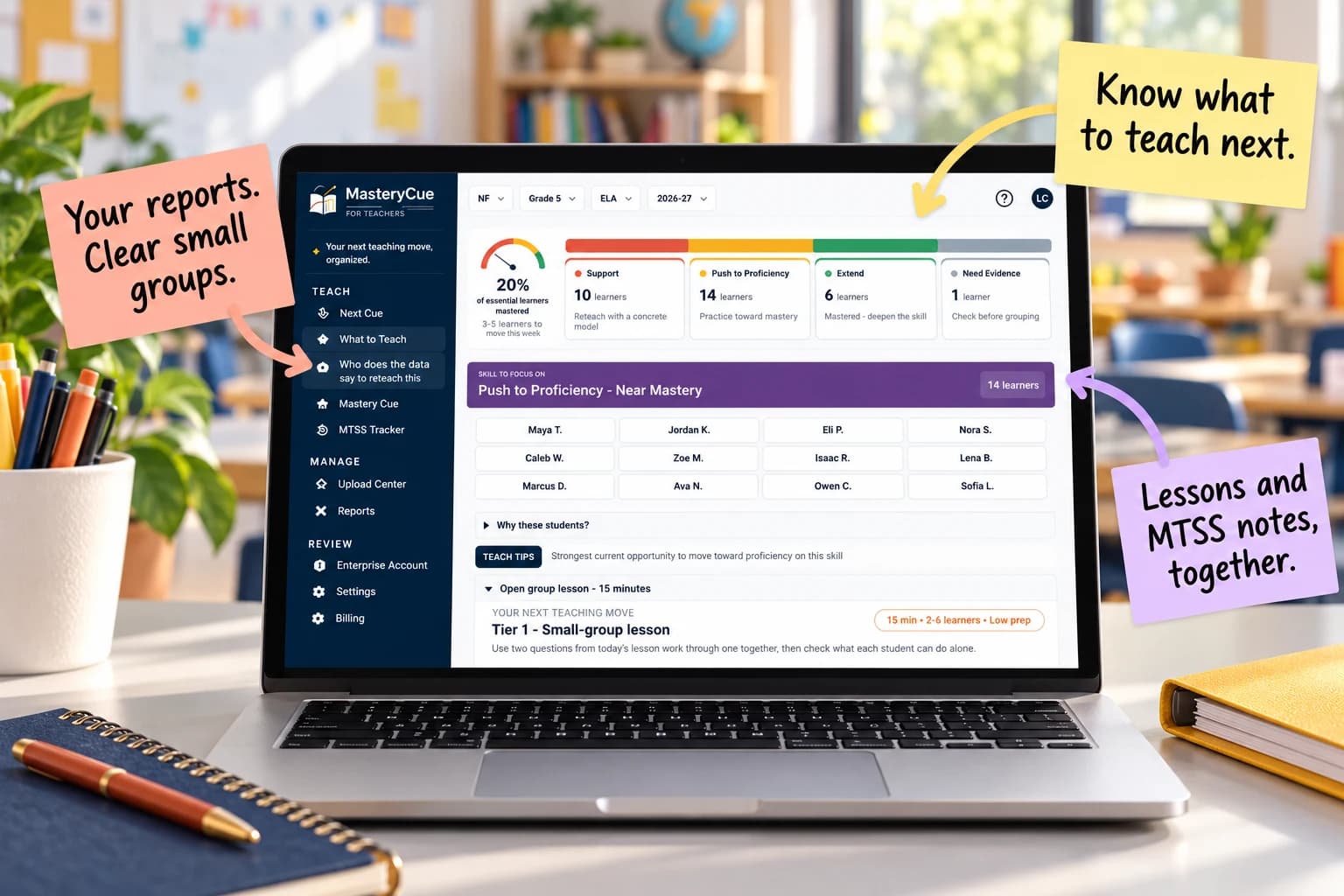
You already have the scores. MasteryCue helps turn supported reports into suggested small groups, focused teaching plans, and dated MTSS notes—so you can spend less time sorting and more time teaching.
✓ Preview the sample class without an account or student data.
Trial: 14 days free. Continue for $12.99/month only if you choose to upgrade.
See which students may need support, a push toward proficiency, or a fresh check—without manually comparing every row.
Review a focused 15-minute routine with modeling, practice, and an independent check already laid out.
Where reviewed guidance is available, see the misconception to watch and a practical response before students repeat the same mistake.
Move from the selected skill to a complete teaching sequence without building each piece from scratch.
Capture lessons, supports, minutes, and checks in dated records so team conversations start with evidence, not a memory search.
Print reviewed daily/sub plans and weekly drafts connected to your available curriculum map.
Built around explicit instruction and gradual release, with Bloom’s / DOK question guidance to build understanding and reasoning. See the teaching approach →
A USEFUL RESOURCE FOR YOUR NEXT SMALL GROUP
Skip the blank planning page. Get a worked 15-minute reading-group lesson, a misconception to watch, an independent check, and four editable planning sheets. Enter your email for access and a private link. No account required.
SOUND FAMILIAR?
The quiz is graded. The reports are ready. But you still have to figure out who needs help, whether the gap is real, and what to teach at tomorrow's small-group table. That means more decisions after an already full school day.
Bring supported reports and classroom checks together instead of starting every grouping decision from scratch.
Review suggested groups, see what evidence supports the next step, and identify students who need another check.
Move from a group list to a focused instructional idea and a way to record what students learned.
WORKS WITH THE REPORTS YOU ALREADY USE
You finished the assessments. Now you need to decide who to pull, what to reteach, and how to document the support—often after the school day ends. MasteryCue helps turn supported reports and classroom evidence into teacher-reviewed groups, targeted lesson ideas, and organized progress notes. Keep the assessment tools your school already uses. Get a clearer next step for tomorrow.
NEW DIAGNOSTIC REPORT PATHS · BETA
We’re expanding diagnostic file imports. These beta paths recognize selected report layouts; format coverage and the full upload-to-recommendation workflow are still being verified.
File imports, not direct vendor connections. Diagnostic scores provide context for follow-up checks; they do not establish mastery of an individual standard or automatically place students in an intervention.
Upload a supported report Review the evidence Plan your next teaching move
Works with supported IXL Score Grids, MAP Growth and aimswebPlus exports, classroom assessments, rosters, and curriculum calendars. Supported CSV, Excel, and recognized text-based PDF layouts require review. Check report compatibility in the FAQ before uploading.
FROM SCORES TO INSTRUCTION · FICTIONAL GRADE 5 CLASS
The question is not just who scored low. It is who needs a focused lesson, who is ready to stretch, and who needs another check. See how a fictional class becomes a practical next step.
| Learner | RL.5.6 check | Evidence |
|---|---|---|
| Student A | 2 / 5 | Needs review |
| Student B | 3 / 5 | Partial |
| Student C | 5 / 5 | Secure |
| Student D | — | Not collected |
| Student E | 2 / 5 | Needs review |
The teacher's question: Who should I pull, and what do I teach them?
Model how a narrator's viewpoint shapes an event → practice with two short passages → collect an independent explanation.
Less sorting. Clearer next steps. See which learners may need support, practice, extension, or another check—and what to teach next. Example uses fictional data; teachers review recommendations before using them.
MasteryCue helps you move from “What am I supposed to do with this data?” to a reviewed group, a teachable next step, and a record of what happened—without rebuilding everything yourself.
COMPLETE ORIGINAL LESSON · FICTIONAL GRADE 5 CLASS
Open a fictional Grade 5 lesson with original reading passages, teacher prompts, student questions, and answer guidance already organized. Spend your energy adapting the teaching—not hunting for every piece. No account required.
Materials: Included Passages A–D, included questions Q1–Q3 and exit ticket E1–E2, pencils; optional projector or printed copies.
Read A and B aloud. Point to ‘he had ruined our work’ and ‘He wanted to move it to the table.’ Say: ‘Mira describes a ruined project; the outside narrator explains an attempt to protect it. The narrator’s knowledge changes how the spill is described.’
Score each response 0–2 with the included rubric: 2 = accurate viewpoint effect plus relevant evidence; 1 = relevant partial understanding; 0 = missing, inaccurate, or unsupported explanation. Use the next-step guide; one exit ticket does not establish sustained mastery.
This fictional example shows what a ready-to-adapt teaching sequence can look like. Other targets may use your current curriculum materials; review the standard, evidence, and preparation before teaching.
HOW IT WORKS
Upload your roster and IXL, MAP Growth, aimswebPlus, or classroom assessments as CSV, Excel, or supported text-based PDFs (up to 10 MB each). Review the matches before approval.
Confirm learner matches, skill alignment, and score meaning. Resolve uncertain records before using them.
Choose a whole-class sequence or a focused 15-minute small-group routine. Review the materials and success check, then record what you taught and what students showed.
Download fictional practice files → · No student records needed to explore the sample.
WHAT YOU CAN DO
Your assessment reports should lead to better teaching, not more spreadsheet work. MasteryCue reviews supported evidence in context and helps build a skill-level mastery picture when the data supports one. It connects that picture to your state standards and curriculum focus, then suggests targeted next steps informed by established classroom practices such as modeling, guided practice, scaffolding, and checks for understanding. When evidence is missing, it says so rather than guessing.
Keep the selected standard and available curriculum map in view. Review the recommendation, adjust the plan, and use an independent check to decide what comes next.
See the groups and lesson change →MasteryCue does not guess when a skill check is missing, automatically place students into Tier 2, or replace school authorization for student uploads. Review the reason behind each suggested group.
What MasteryCue can and can’t do →BUILT FOR THE CLASSROOMS YOU SERVE
Built for K–12 ELA, mathematics, science, and social studies. Confirm the released state, grade, subject, and high-school course you need.
Check your standards →MORE THAN AN ASSESSMENT SCORE
You've already paid for the assessments and spent time giving them. MasteryCue helps you turn supported evidence into a clearer next teaching decision—who to check, what skill to focus on, and how to get a small group moving.
See a teacher-reviewable mastery picture where the skill evidence supports one, and a clear Need Evidence prompt where it doesn't.
Connect your current standard and curriculum focus with practical scaffolds, checks for understanding, and targeted teaching ideas.
Review what you taught, record what students showed, and keep progress notes close to the instructional decision.
Use Star, i-Ready, or mCLASS? Spend less time translating assessment reports and more time teaching. MasteryCue is rolling out Star, i-Ready, and mCLASS report compatibility, with automatic student matching for recognized layouts and clear follow-up when evidence needs a closer look. Explore the teaching workflow with a fictional sample class today.
Yes. Open the complete fictional Grade 5 sample class without an account.
Recognized IXL Score Grid, MAP Growth, and aimswebPlus exports, plus supported classroom formats, can be reviewed. Accepted CSV, XLS/XLSX and text-based PDF layouts vary. Check all report questions.
Confirm school authorization before sending identifiable classroom or student records into MasteryCue. A public sample needs no student records.
Your trial ends without an automatic charge. Continue for $12.99/month or $99/year only if you choose to upgrade.
ONE TEACHER WORKSPACE
Get skill-based groups, ready-to-adapt lessons, and progress notes in one place. Start with a fictional sample class.
$12.99/month if you choose to upgrade
Start my free trial →14 days free. Your trial ends without an automatic charge. Upgrade only if you choose.
Prefer annual? $99/year — save approximately 36%. Choose at checkout.